Best Shopify Dropshipping Apps for Beginners in 2026: 10 Tools Compared
Shopify gives a seller the storefront, checkout and order-management infrastructure needed to run an independent ecommerce business, but it does not automatically provide products, suppliers or fulfillment.
That is where dropshipping apps come in.
Some apps focus on importing products from AliExpress. Others combine supplier discovery with order automation. Some provide sourcing and fulfillment support, while another group focuses on local suppliers, print-on-demand or multi-channel automation.
For beginners, the difficult part is not finding an app. The Shopify ecosystem contains plenty of them.
The difficult part is choosing an app that matches the stage of the business without creating unnecessary cost or operational complexity.
A beginner testing one product does not need the same system as a store processing several hundred orders per day. This guide compares the main Shopify dropshipping app models in 2026 and explains which type is most useful at each stage.
What Does a Shopify Dropshipping App Actually Do?
At its simplest, a dropshipping app connects a Shopify store with one or more suppliers.
When a seller finds a product, the app may import the title, images, variants and pricing into Shopify. After a customer orders, the app can send that order information to the supplier and later return tracking information to the store.
More advanced systems go further.
They may synchronize inventory, compare suppliers, automate pricing, provide warehouse options, coordinate sourcing or connect several sales channels to one fulfillment workflow.
This is why “dropshipping app” has become a broad term.
Two apps can both appear inside Shopify while performing completely different roles in the supply chain.
Do You Need a Dropshipping App to Use Shopify?
Not necessarily.
A merchant can theoretically receive a Shopify order and manually send the details to a supplier.
That works when order volume is extremely low.
But manual workflows quickly create problems.
Addresses can be copied incorrectly. Variants can be missed. Tracking numbers may not be returned to Shopify. Inventory changes can create overselling, and processing ten or twenty orders every day becomes repetitive.
An app reduces that manual work.
For beginners, the value is convenience.
For larger stores, the value increasingly becomes consistency.
The right app should reduce operational mistakes rather than simply add another dashboard.
Before Choosing an App, Decide What Problem You Need It to Solve
Beginners often compare apps by looking at the number of products inside each catalog.
That is only one factor.
The first question should be whether you need product discovery, supplier access, order automation, private sourcing, local fulfillment, print-on-demand or multi-store management.
For example, a beginner testing AliExpress products may primarily need simple product importing and automated ordering.
A fashion store may need a supplier specialized in apparel.
A store that already has a winning product may care more about supplier consistency and QC than catalog size.
A seller expanding from Shopify into TikTok Shop and eBay may care more about order synchronization than product discovery.
When the actual problem is defined first, the app comparison becomes much easier.
Quick Comparison of Shopify Dropshipping Apps
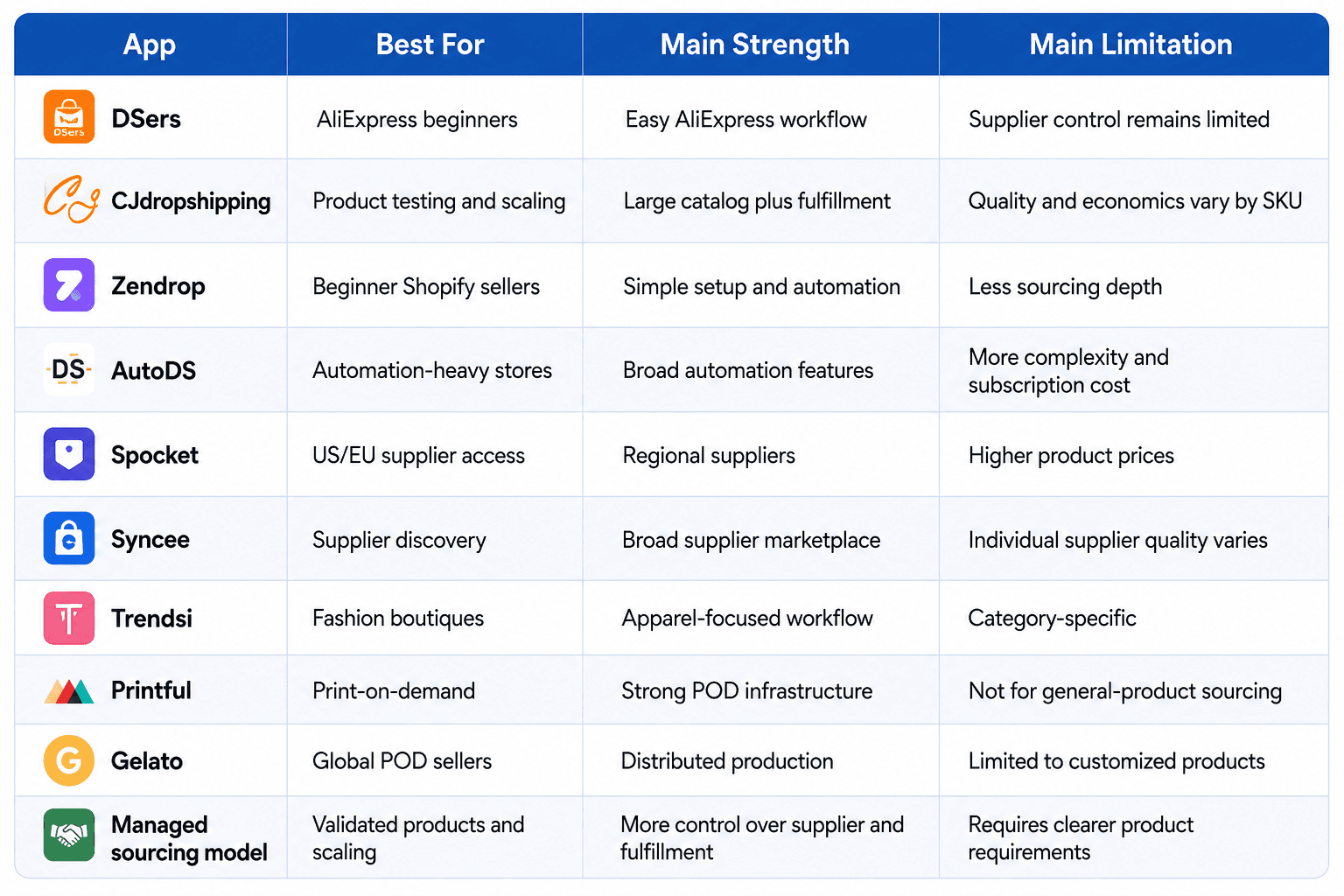
1. DSers — Best for Beginners Using AliExpress
DSers remains one of the most familiar options for sellers who want to build an AliExpress-based Shopify workflow.
Its main advantage is simplicity.
A beginner can find products from AliExpress, connect them with Shopify and reduce the amount of manual work required to place individual customer orders.
This is especially useful during the testing stage.
If a seller is trying several products and does not yet know which one will succeed, building a private supply chain for every test would create unnecessary work.
The trade-off is that DSers does not remove the limitations of marketplace sourcing.
The physical products are still supplied by individual AliExpress sellers, which means quality, processing times, packaging and stock reliability can vary.
For early testing, that flexibility may be worth more than control.
For a validated product, the priorities often begin to change.
2. CJdropshipping — Best for a Broader Product and Fulfillment Workflow
CJdropshipping operates beyond simple AliExpress order automation.
The platform provides a broad product catalog, sourcing requests, warehousing, order fulfillment and multiple ecommerce integrations.
That makes it useful for sellers who want more infrastructure than a basic marketplace workflow but still prefer to browse products inside a platform.
A beginner can use CJ to explore products and fulfill individual orders, while a growing seller may also investigate sourcing or warehouse options.
The main benefit is that product access and fulfillment sit inside one ecosystem.
However, sellers still need to evaluate individual products carefully.
A large catalog does not mean every SKU has identical quality, shipping performance or profitability.
Samples and real shipping tests remain important.
3. Zendrop — Best for Simple Beginner Setup
Zendrop is positioned strongly around ease of use.
For someone launching a first Shopify store, a simplified interface and integrated product-importing workflow can reduce technical friction.
This matters because beginners already need to learn product research, store design, content, customer service and marketing.
Adding an unnecessarily complicated backend can make the launch harder.
Zendrop can therefore work well when the priority is getting a simple dropshipping workflow running quickly.
Its limitations become more noticeable when a product requires deeper supplier control.
If a store eventually needs specific factories, exact product specifications, more complex QC or customized production, a simple app-based catalog model may no longer be enough.
4. AutoDS — Best for Sellers Who Want More Automation
AutoDS emphasizes automation across product importing, price monitoring, stock monitoring and order management.
This can become valuable when the seller manages many products or multiple suppliers.
The main advantage is time.
Repeating the same operational tasks manually across dozens or hundreds of listings creates a large workload.
Automation can reduce that workload and allow the seller to focus more on product selection, marketing and customer experience.
But automation should not be confused with supply-chain quality.
Software can detect price changes and route orders.
It cannot automatically guarantee that a supplier uses stable materials, ships the correct product or maintains good packaging.
The more important a SKU becomes, the more the seller still needs to understand what happens physically behind the app.
5. Spocket — Best for US and European Supplier Access
Spocket focuses heavily on suppliers located in or serving markets such as the United States and Europe.
This can appeal to sellers who want shorter shipping distances and a stronger local-fulfillment angle.
The advantage is potentially faster delivery.
If products are already located closer to the customer, the seller may avoid some of the long cross-border shipping times associated with direct China fulfillment.
The trade-off is usually cost.
Local suppliers often charge more than Chinese factories or marketplace sellers.
That difference may still be worthwhile if faster delivery supports a higher conversion rate or stronger customer experience, but the economics need to be calculated carefully.
A faster product is not automatically a more profitable product.
6. Syncee — Best for Broad Supplier Discovery
Syncee gives merchants access to a marketplace of suppliers across different regions and product categories.
This makes it useful for sellers who do not want their sourcing strategy tied to one marketplace or one country.
The strength is supplier variety.
A merchant can investigate different sourcing options while remaining inside a structured platform.
However, the quality of the overall network does not replace the need to evaluate individual suppliers.
Lead times, return policies, stock accuracy and product quality can vary significantly.
The merchant still needs to understand the business behind the listing.
7. Trendsi — Best for Fashion Dropshipping
Trendsi is more specialized than general-product dropshipping apps.
Its focus on apparel and fashion can make it attractive to boutiques that want a workflow designed around that category.
Specialization matters because fashion has particular operational challenges.
Sizing, materials, seasonal collections, product photography and returns all influence customer satisfaction.
A fashion-focused system can make supplier discovery and product management easier.
But the seller still needs accurate size charts, clear product information and realistic return economics.
Fashion can generate strong revenue while producing weak profit if sizing problems create excessive returns.
8. Printful — Best for Established Print-on-Demand Infrastructure
Printful is fundamentally different from general dropshipping apps because it produces customized products after customers order.
The seller provides the design.
Printful handles production and fulfillment.
This works well for apparel, accessories, home products and merchandise where the seller's design is the main reason customers purchase.
The advantage is differentiation.
Two sellers may use the same base T-shirt but create completely different offers through their designs and audience positioning.
The limitation is that print-on-demand does not solve general-product sourcing.
A store looking for electronics, household accessories or automotive products would need a different supply-chain model.
9. Gelato — Best for Distributed Print-on-Demand Production
Gelato also operates in print-on-demand but places strong emphasis on distributed production.
Products may be produced closer to customers through its manufacturing network rather than always being shipped internationally from one location.
That can reduce delivery distance for suitable products.
As with Printful, however, the value comes primarily from the seller's design and audience rather than finding a generic winning SKU.
Print-on-demand and traditional product dropshipping therefore solve different business problems.
A seller choosing between them should first decide whether the business is built around original creative assets or around sourcing and merchandising physical products.
10. Managed Sourcing and Fulfillment — Best After a Product Is Validated
A managed sourcing model is less like installing a product-catalog app and more like connecting Shopify to a supply-chain partner.
The seller usually provides the product requirement.
The sourcing team then identifies suppliers, compares quotations, coordinates samples and eventually processes customer orders.
This model is usually unnecessary for a product that has never sold.
During early testing, marketplace apps provide more flexibility.
Once a SKU develops predictable volume, however, the questions change.
The seller may want to know exactly which factory produces the item, whether the same materials will be used next month, how inventory can be buffered and how QC is handled before shipment.
At that stage, deeper supplier control can become more important than browsing another catalog.
The Best App Depends on the Stage of the Store
There is no reason for a Shopify seller to use the same system forever.
During the earliest stage, product-testing speed may matter most.
The seller needs a simple way to test demand without buying large quantities of inventory.
When one product begins working, supplier reliability becomes more important.
Later, the store may need inventory planning, QC, branding or more advanced order automation.
This suggests a progression rather than a permanent app choice.
A Shopify store can change the backend while keeping the same storefront.
That flexibility is one of the platform's major advantages.
If you are still deciding whether Shopify is the right storefront in the first place, the broader comparison of ecommerce platforms for dropshipping separates that platform decision from the app and supply-chain decisions discussed here.
Do Not Install Too Many Apps at the Beginning
One of the easiest ways to make a new Shopify store expensive and complicated is to install an app for every possible problem.
Each subscription looks small individually.
Together they can create meaningful fixed costs.
Apps can also overlap.
Two tools may both manage tracking, reviews, product importing or analytics.
Too many apps can make troubleshooting harder and can sometimes affect storefront performance.
A beginner should therefore start with the minimum stack required to operate the store.
Add another tool when there is a clear problem to solve.
Do not add it simply because another seller has it installed.
Separate Product Sourcing Apps From Marketing Apps
Dropshipping discussions often mix completely different types of Shopify apps.
A sourcing app determines how the product reaches the store and customer.
An email app helps communicate with customers.
A review app provides social proof.
An analytics app helps measure performance.
An upsell app may increase average order value.
These tools can all be useful, but they should not be judged according to the same criteria.
The sourcing and fulfillment layer deserves particularly careful evaluation because mistakes there affect the physical customer experience.
A marketing app can usually be removed quickly.
Changing the supply chain behind a major winning product can be much more disruptive.
Evaluate the Real Cost of an App
Subscription price is only one part of app economics.
Some apps may charge transaction fees, product markups or higher shipping prices.
Others may have cheap software but require more manual work.
A tool that costs $49 per month but saves ten hours of repetitive order work may be cheaper operationally than a free tool.
Likewise, a free sourcing app is not inexpensive if the products consistently arrive late and generate refunds.
The correct comparison is the total effect on the business.
Ask whether the app reduces cost, time, errors or risk enough to justify using it.
Check Whether Product and Tracking Data Sync Correctly
Automation is valuable only when the information is accurate.
Before scaling, test the complete order flow.
Place an order through Shopify.
Confirm that the correct SKU and variation reaches the supplier.
Check that the shipping address transfers correctly.
Watch when tracking becomes available.
Then confirm that the tracking information returns to Shopify and appears correctly in customer notifications.
This test should happen before serious advertising begins.
An app can look perfect in the dashboard while still creating problems in the real order workflow.
Inventory Synchronization Matters More as Sales Increase
Overselling is manageable when a store receives one order every few days.
It becomes much more damaging when advertising suddenly generates hundreds of orders.
If the app displays stock that the supplier cannot actually fulfill, customers may wait several days before learning that the product is unavailable.
This creates cancellations and support requests.
For important SKUs, sellers need to understand where inventory information comes from.
Is it live warehouse inventory?
Supplier-reported stock?
Marketplace availability?
A periodically synchronized number?
The more important the SKU becomes, the more accurate that information needs to be.
Shipping Options Should Be Evaluated by Market
A dropshipping app may advertise worldwide shipping, but that does not mean every route performs equally well.
Delivery time and cost depend on destination, product weight, dimensions and special characteristics.
A shipping line that works well for ordinary accessories may not accept batteries.
A route that performs well to France may not be the best option for Canada.
Sellers should therefore evaluate logistics by product and destination rather than relying on one general shipping claim.
Real test orders provide much better evidence than advertised averages.
Product Quality Cannot Be Automated Away
Apps make products easy to import.
That ease can create a false sense that products are already approved.
They are not.
The seller remains responsible for what customers receive.
Samples are therefore important, especially once a product begins showing real demand.
Check materials, dimensions, color, packaging and functionality.
For higher-risk categories, also investigate relevant product compliance and documentation.
An app can simplify the transaction.
It cannot replace product judgment.
When Should You Move Beyond a Catalog-Based App?
Catalog apps are extremely useful while product demand is uncertain.
They allow sellers to test without building a supplier relationship for every idea.
Once a product produces stable volume, several signals may indicate that the backend should change.
Supplier prices may fluctuate.
Stock may become unreliable.
Product specifications may vary.
The store may need better packaging or QC.
A marketplace supplier may also struggle to process higher daily volume consistently.
At that stage, the seller can compare deeper sourcing and fulfillment options.
The goal is not to abandon apps.
It is to use a supply chain appropriate to the maturity of the product.
What Happens When You Add TikTok Shop, eBay or Etsy?
A Shopify store often begins as a single-channel business.
Later, the same products may be listed on TikTok Shop, eBay, Etsy, WooCommerce or Amazon.
At that point, the app problem becomes different.
The seller now needs to prevent duplicate orders, maintain consistent SKU mapping, synchronize inventory and return tracking information to several platforms.
Running each channel through a separate spreadsheet or unrelated fulfillment workflow becomes increasingly difficult.
A multi-platform store integration becomes relevant when Shopify orders need to share inventory, fulfillment status and tracking with other sales channels rather than being managed as isolated stores. ETdropship's current integration service specifically supports Shopify, TikTok Shop, WooCommerce, Etsy, eBay and Amazon order and tracking synchronization.
A Simple Shopify App Stack for Beginners
A beginner does not need a complicated technology stack.
Start with Shopify itself.
Add one sourcing or dropshipping app.
Use the payment tools required for your target market.
Add basic analytics so you know where customers come from and whether the store converts.
Email can be added when there is enough traffic and customer data to justify it.
Reviews can be useful when customers begin providing genuine feedback.
Other tools should follow actual operational problems.
This approach keeps fixed costs low and makes it easier to understand which app is responsible when something breaks.
A Better Stack for a Growing Store
As sales increase, the stack changes.
The seller may need stronger inventory synchronization.
Customer-service tools can become worthwhile.
Email and retention systems become more important as the customer list grows.
Analytics may need to connect advertising performance with actual product and fulfillment costs.
The supply-chain layer may also move from basic marketplace automation toward more controlled sourcing.
What matters is that each tool has a job.
A growing Shopify store should not become a collection of subscriptions accumulated over time without anyone knowing why they are still installed.
How to Choose Between Two Similar Apps
When two apps appear similar, compare them using a real SKU rather than feature pages.
Use the same product.
Use the same destination.
Compare the product cost, shipping route, processing time and expected delivery.
Order samples if the product matters.
Check how the order enters Shopify and how tracking returns.
Ask what happens if the supplier runs out of stock.
Then compare support responsiveness when something goes wrong.
A real workflow reveals differences that marketing pages usually do not.
Should Beginners Choose the Cheapest Shopify App?
Not automatically.
A free or inexpensive app can be perfectly suitable for product testing.
But the cheapest subscription does not matter if product costs are higher, shipping is unreliable or orders require frequent manual correction.
At the same time, paying for an advanced system before the store has meaningful sales is also wasteful.
The correct app is not the one with the lowest monthly price.
It is the one that solves the current operational problem at a reasonable total cost.
Frequently Asked Questions
What is the best Shopify dropshipping app for beginners in 2026?
There is no single best app for every beginner. DSers can work well for AliExpress-based testing, CJdropshipping provides a broader sourcing and fulfillment ecosystem, and Zendrop emphasizes ease of setup. The right choice depends on the product and supply-chain model you want to use.
Is DSers still good for Shopify dropshipping?
DSers can still be useful for sellers using AliExpress because it simplifies product importing and order management. Its main limitation is that the underlying suppliers remain independent marketplace sellers.
Is CJdropshipping better than AliExpress?
Not automatically. CJ provides a more centralized catalog, sourcing and fulfillment workflow, while AliExpress offers enormous marketplace flexibility. CJ may become more useful when sellers want a more structured backend.
Do Shopify dropshipping apps automatically fulfill orders?
Many can automate parts of order routing and tracking synchronization, but the exact workflow varies. Sellers should test the complete order process before relying on automation at scale.
How many apps does a beginner Shopify store need?
Usually fewer than beginners expect. One sourcing app plus the essential tools required for payments, analytics and basic store operation can be enough initially. Add additional apps only when they solve a specific problem.
Can I change dropshipping apps after launching?
Yes, but changing the backend of an actively selling SKU needs care. Product mapping, inventory, supplier specifications and order processing should be checked before moving significant volume.
Can one Shopify dropshipping app manage TikTok Shop and eBay too?
Some systems support several sales channels, while others are primarily Shopify-focused. Sellers expanding across multiple platforms should check whether inventory, orders and tracking can be synchronized across the channels they actually use.
Do I need a private supplier instead of a Shopify app?
Not during every stage. Catalog-based apps are often ideal for early testing. Private sourcing or a managed supplier relationship becomes more relevant when a validated SKU needs better consistency, pricing, QC or customization.
Conclusion
The best Shopify dropshipping app in 2026 is not necessarily the app with the largest catalog, the most automation features or the lowest subscription fee.
It is the one that fits the current stage of the business.
A beginner needs flexibility and a simple way to test demand. A growing store needs reliable order execution and accurate inventory. A validated product may eventually require stronger supplier control, while a multi-channel business needs orders and tracking synchronized across several platforms.
This is why Shopify sellers should avoid thinking of their first app choice as permanent.
The storefront can remain stable while the backend evolves.
Start with the simplest system that can reliably process the orders you have today. Test the real product and shipping workflow. Watch where errors appear. Add complexity only when volume creates a reason for it.
That produces a much healthier Shopify stack than installing every popular app before the first meaningful order arrives.